 BrickBuilder
AI and LEGO
AI for BrickLink Studio: meet BrickBuilder Studio
Create custom AI brick designs, make manual edits, and bring your models back for AI revisions and parts ordering.
Jake ·
If you have been looking for a way to use AI with BrickLink Studio, there is now a practical workflow: create or edit a model in BrickBuilder, make hands-on changes in the new BrickBuilder Studio, and exchange LDraw files with native BrickLink Studio whenever you want.
BrickBuilder Studio is our new dark 3D building workspace for the web and desktop. It brings manual brick editing next to BrickBuilder’s AI design tools, so a model can move between a written idea, individual brick adjustments, and another AI revision.
I’m Jake, the creator of BrickBuilder. This is a release announcement from the team building it. BrickBuilder Studio is independent software, not an official BrickLink plugin or a LEGO Group product.
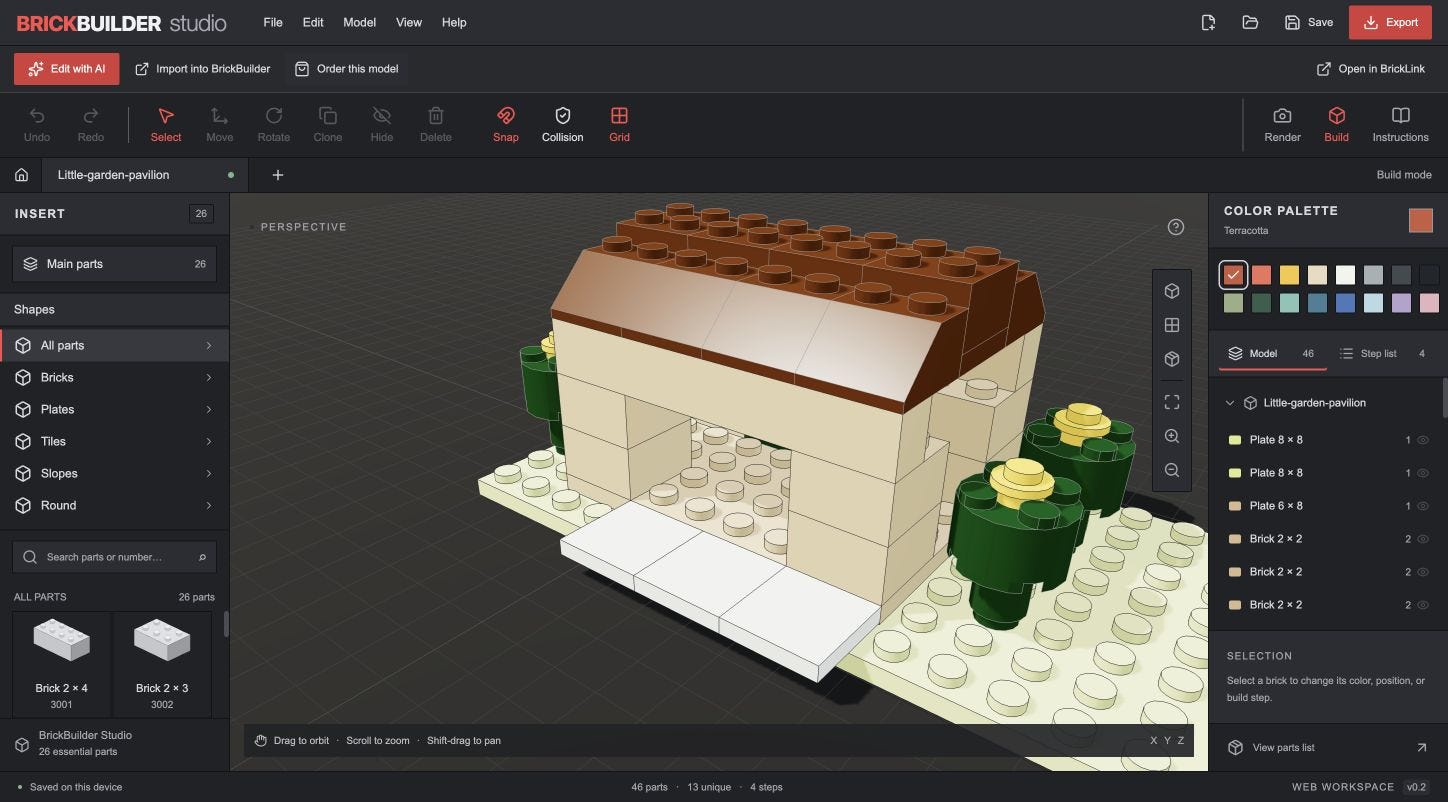
AI ideas, with hands-on control over the details
Start with a custom AI design in BrickBuilder: describe a small building, a vehicle, a creature, or another idea you want to turn into a brick model. Once the model is ready, choose Edit in BrickBuilder Studio beneath the preview.
The new workspace puts the model in a familiar CAD-style layout: parts on the left, the 3D canvas in the middle, and colors and model controls on the right. Select bricks, change colors, adjust positions, rotate, clone, hide, delete, undo, and organize build steps. You can work with the keyboard or use the inspector for numerical position changes.
That is useful when an AI design is close to what you want, but you want to move a detail yourself or try a different color on a specific part.
Bring your model back for another AI edit
The prominent Edit with AI and Import into BrickBuilder actions both send the current model into the edit stage on BrickBuilder’s landing page. You can describe the next change there: change the roof, add a feature, or adapt the design to a different look.
This works with imported models too. BrickBuilder accepts native Studio .io files and LDraw .ldr or .mpd files. BrickBuilder Studio itself opens .ldr and .mpd files for manual editing. Keep a saved original before starting a new revision.
Keep native BrickLink Studio in the workflow
The connection is LDraw, an established file format for digital brick models. Native BrickLink Studio can open LDraw models and can export models as LDraw.
In BrickBuilder Studio, choose Export → BrickLink Studio / LDraw to download a .ldr file, then open it in native Studio. To return, export LDraw from native Studio and open that file in BrickBuilder Studio, or import it into BrickBuilder for AI editing.
Open in BrickLink also offers a link through the installed BrickBuilder Studio desktop bridge. Both desktop apps are required, and native Studio may show its own startup prompts. The file download remains available if a browser or desktop installation cannot complete the handoff.
From a digital model to ordering parts
Order this model carries the model to BrickBuilder’s order page. Imported designs first need an AI edit that checks the design against available parts and colors. Review that revised model, then continue to its kit price and checkout. Sending a model does not place an order, and AI edits use your normal BrickBuilder plan or credits.
What this first release includes
BrickBuilder Studio is an early release with a 26-part starter palette, imported LDraw geometry, and support for models up to 2,000 parts and 100 steps. It provides familiar manual building controls, but it does not yet match native Studio’s full catalog, connection tools, stability analysis, or rendering features. Native Studio remains an optional part of the workflow for those jobs.
Try the manual editor at studio.brickbuilder.ai. To create a custom AI design, revise an existing model, or prepare a model for parts ordering, start at BrickBuilder.ai.
AI and LEGO is an independent publication. AI assisted with research and drafting; product behavior and documentation were checked for this release. LEGO and BrickLink are trademarks of their respective owners.
Originally published on AI and LEGO on Substack.